



Gamers Unite Toolbar application or remove
To be removed from the list again you have to go through only two steps
Step 1: Uninstall the Toolbar in Firefox GamersUnite
To remove the toolbar in Firefox again click on "Tools-> Add-ons
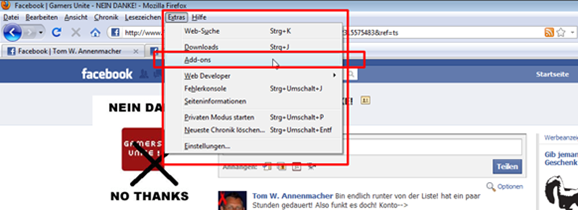
Now you looking for the "GamersUnite" Toolbar "and click" Uninstall "

Step 2: Remove the application itself in your profile
To the Gamers Unite Toolbar to remove clicks in your profile (top right) to "Account-> Application Settings"

and is looking for "GAMERS UNIITE" and click on the "X"
(On this screenshot, I can not display this is no longer optically as we do not have the toolbar in use) but the "X" is identical!

Wait!
More you can not do at the moment and now it’s because you’re not waiting down immediately from the list. It may take several hours or even days until you’re lost! Ask best friends / neighbors if you see you still can!
Gamers Unite – NEIN DANKE!
Gamers Unite – NO THANKS!


Kostenlos · der tägliche Mimikama-Newsletter
Fakten statt Aufregung. Direkt in dein Postfach.
Die wichtigsten Faktenchecks und Meldungen des Vortags – jeden Morgen kostenlos und unabhängig vom Social-Media-Algorithmus.

Hinweis: Stand zum Veröffentlichungsdatum.
Verwendete Bilder, Screenshots und Medien dienen ausschließlich der sachlichen Auseinandersetzung im Sinne des Zitatrechts (§ 51 UrhG).
Teile dieses Beitrags können KI-gestützt erstellt und redaktionell geprüft worden sein.
(Mehr zur Arbeitsweise)
